

Track Plugin
4 Core Elements
- AI Analysis
- Reference Track Analysis & Matching
- Tonal Shape Matching
- General EQ & Dynamics controls
Important: To use the track plugin AI feature, ensure you have Sizzlerize Neural Master setup on your Master output, even if you are not using the Master plugin for anything else.
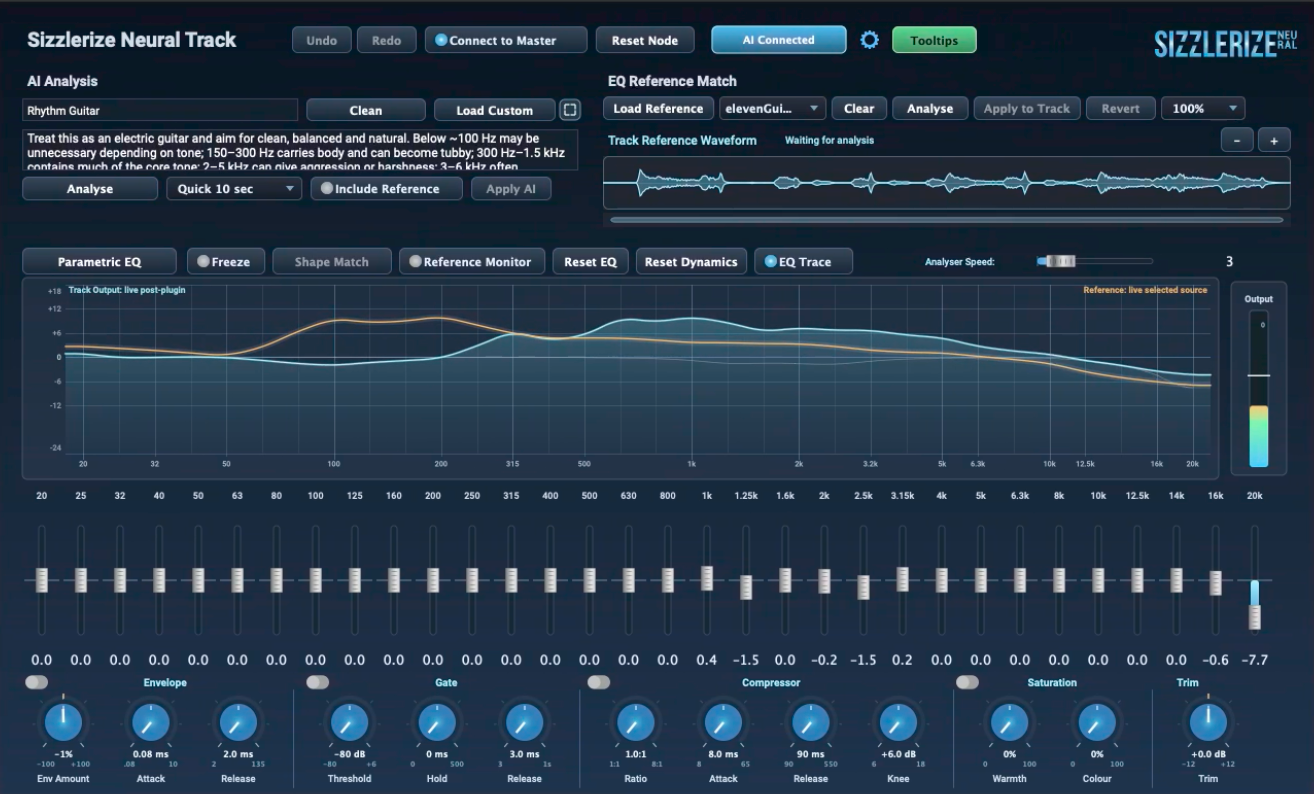
AI ANALYSIS
- Give your track a name so you can identify it easily in the Master plugin if needed.
- Choose a description from the presets or craft your own AI prompt.
- Play the track part you're analysing and hit analyse
- Hit Apply AI to hear the results
- If you have a reference track loaded, AI will take this into account during analysis.
EQ REFERENCE MATCH
- Give your track a name so you can identify it easily in the Master plugin if needed.
- Choose a description from the presets or craft your own AI prompt.
- Play the track part you're analysing and hit analyse
- Hit Apply AI to hear the results
- If you have a reference track loaded, AI will take this into account during analysis.
SHAPE MATCH
- Shape Match attempts a broad tonal match to your reference track
- Load a reference track
- Hit play, freeze the analyser state and hit Shape Match
- Full or various ranges can be matched
- EQ will adjust accordingly
Bear in mind that Shape Matching is not always going to achieve a 100% match.
GENERAL EQ/DYNAMICS
- Switchable Graphic and Parametric EQ
- Envelope
- Gate
- Compressor
- Saturation
- Trim
Sizzlerize EQ
How to use
Tech Spec Sheet
AI Set Up
Local AI
Local AI requirements
Remote APIs
Reference Tracks
Analysis
Stem Splitting